Introducing Frame 3.0
Frame 3.0 is a massive update with analytics, an API, full-body avatars, and more.
If you're new to Frame, Frame is the easiest way to create your own corner of the metaverse. It works on desktop, mobile, and VR because it runs directly from a web browser. Frame is great for immersive meetings, events, classes, and more. It lets you create spatial, multi-user sites with ease.
Fundamentally, we believe that the web browser IS the metaverse, and that we're entering a new era of spatial computing that will result in many traditional web sites, apps, and services existing on the spatial web alongside the 2D interfaces that we're used to today.
We just released a huge update to Frame. It includes analytics, a new API, experimental full body avatars, new graphics capabilities, a redesigned user interface, and a whole lot more. Let's dive into Frame 3.0.
Analytics
There's a new button in the sidebar menu that looks like a little graph. Click it and you'll see the analytics pop-up.
This gives you a graph and also an activity feed. Where tracking a few event types at first: connected (for when someone connects to your Frame), assets added, links clicked, and poll responded. You can see who has done these things and what time they did it. For connections, you can see what website people came from to get to your Frame. For links clicked, you can see what assets people clicked on. For poll responses, you get to see how people responded to various polls (but if those polls were anonymous, you won't be able to see who responded!).
We'll be adding more events to our analytics view in the months ahead, but we think this is a great start.
*Note that if you're an enterprise, metaverse-as-a-service customer, you get a separate analytics dashboard that reflects all the Frames throughout your domain for a birds-eye view of activity throughout your whole metaverse.*
API
Frame is built so that non-technical users can use it to create compelling, useful immersive experiences with just a few clicks. That remains one of our core missions.
With this release, though, we're also making it possible for developers to use code to modify their Frames' settings, assets, and members/admins lists. We've launched a Frame API.
This API lets you do a lot of things. You could set up an endpoint so that people who get onboarded as users to your applications or companies automatically get added as members to particular Frames. You could set up a script that replaces the source URL for an image in your Frame, letting external triggers determine what image shows up on a wall.
Your script could also replace the source .glb reference for your 3D models. Or, your script could modify any of dozens of other properties on Frame assets. Your scripts can even create assets dynamically.
Because Frame can be embedded in other websites with an iFrame, you could make buttons on the parent website that cause changes in the Frame itself!
You can find your API key in the Profile section of the sidebar menu. To modify an asset with the API, you need its asset ID. You can find this in the Asset Edit Menu when you click on the asset, or in the Asset List for your Frame in the Sidebar.
We're excited to see what you do with this API, and we'll be augmenting it quite a bit in the months ahead in response to your feedback.
More Environment Capabilities: Lights, Shadows, Nav-Meshes
We typically try to make graphics in Frame as optimized as possible to ensure decent performance across a wide range of devices. This means limited geometry, baked lighting or lightmaps, hyper-compressed textures, and many other tricks we've picked up over the years. That said, we know that many of you want to take your graphics a bit further, even if it means your Frame will no longer will run smoothly on lower end hardware.
The metaverse contains multitudes. Some of those multitudes just won't work on that old iPhone.
Now, Frame environment creators can incorporate lights, animated lights, shadows, and custom navigation meshes into their environment uploads.
We have documentation on bringing lights into your environment here, and you can turn shadows on inside your Frame settings. Notice that shadows will only appear if your environment uses lit textures. Expect an fps hit if you activate this. Notice you can now also turn off our default scene lights in your Frame settings, if you want to rely entirely on your own custom lights.
For navigation meshes, by default we will still create a navigation mesh for your uploaded environment model automatically. Now, though, if you want to provide a custom mesh for the navigation mesh to have more control over it you can do so by including another .glb file in your upload with _nm in the file name.
Improved User Interface
As Frame gets more features, our user interface gets more cluttered. We reached a clear breaking point in our sidebar interface. Our sidebar has always been a bit cramped because we put so much into such a small, narrow window. In this release, we've simplified things dramatically and done some rearranging.
There are other areas of the user interface that have gotten design tweaks. For veteran Frame users, these are the ones that might take you by surprise:
- In the Asset Edit Menu, you have to use the trash can at the top to delete the asset. We got rid of the large "delete asset" button at the bottom
- In the People Menu, the buttons to go to a user, see their social links, and more are automatically expanded without requiring a click
- The Go To Menu has been given a minor redesign
- For adding assets to Frame, you have to use the blue plus button in the toolbar at the bottom of the screen
- We recommend using the mic button and edit mode buttons in your toolbar, but if you want to access them in the sidebar then use the new "Quick Settings" dropdown at the top of it
- You can now rename assets in your inventory or your asset lists
Full-Body Avatars
To be full-bodied, or not to be - that is the question. And either way you answer is okay! You can opt in to our new experimental full-body avatars and try them out.
Note: doing this will change the scaling of the Frame environment you have in your Frame, so your assets might look misaligned or need re-scaling. This doesn't affect any of your custom environments. We recommend making the adjustments you need so that you can make this transition.
The Frame art team has figured out some really clever tricks to bring these full-body avatars to life. They are performant and playful. We also have some other facial shape variants.
Please note that these avatars are still experimental - we have noticed some issues with them on Quest 2 that we are actively resolving, but until then if you have people joining from Quest 2 you may want to stick to the torso avatars for now.
Question Queue for Support Centers or Classrooms
Sometimes you may want to raise your hand without repeatedly clicking the hand emoji. Or, you may want to indicate that you need help without roaming around and talking to everyone who will listen to you.
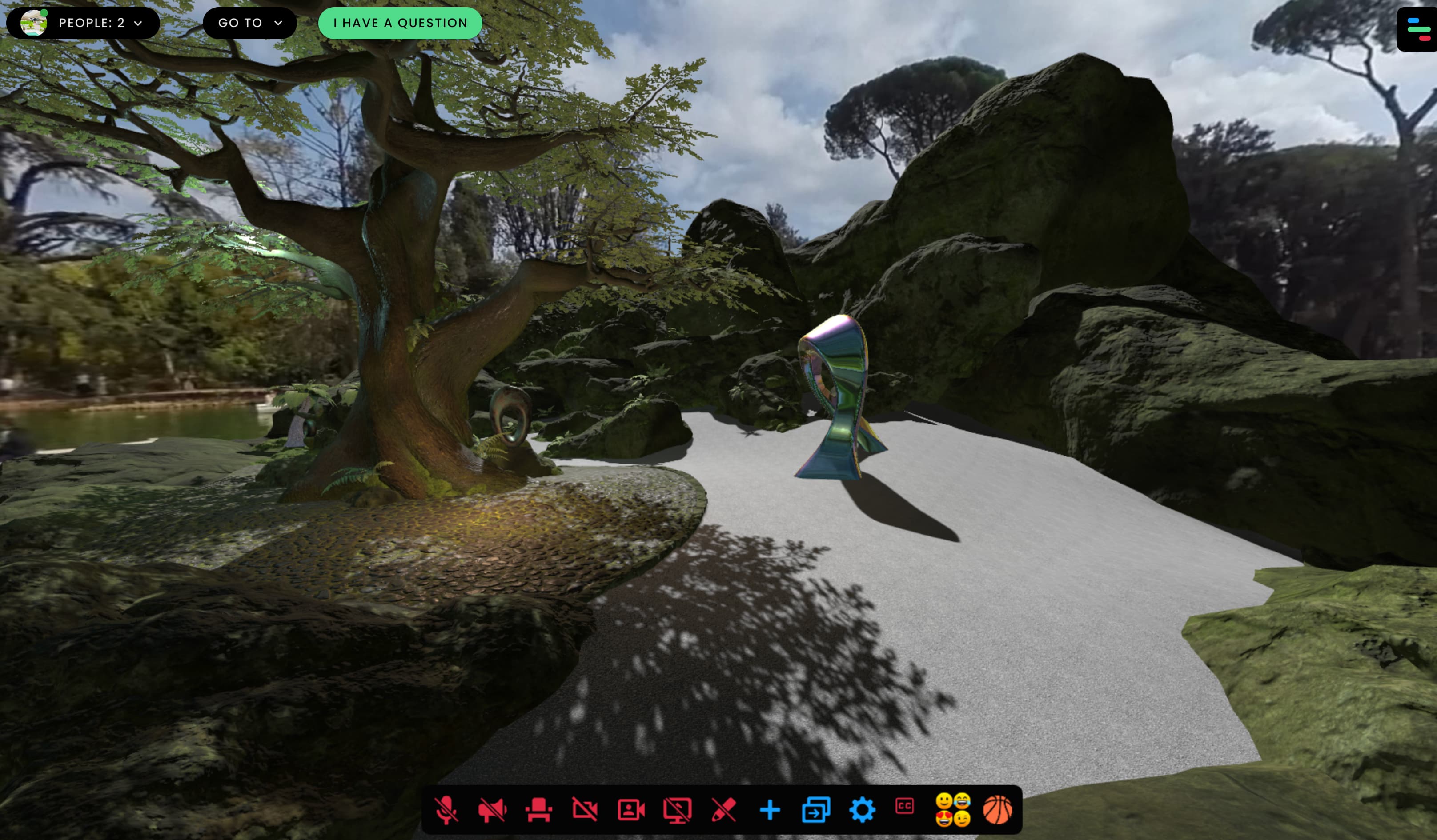
If you enable the "question queue" feature in your Frame settings, users will get a new "I have a question" button at the top of the screen. If they click this, then admins in the Frame will be able to see a "someone has a question" indicator at the top left of the screen. If an admin opens the people menu, they can see which users need help.
Support Center + Experiments Environments
We have two gorgeous new Frame environments that you can choose from for your Frame: the Support Center and one called Experiments.
The Support Center is designed for customer support teams who need a space for handling lots of users who need help. There are plenty of private voice zones, support tables, private offices, and also a chill outside area for more casual mingling.
Our other new environment, Experiments, is designed to showcase some of the graphics techniques that are now possible in your own uploaded Frame environments. You'll see real-time shadows, lights, and PBR materials making using of reflectivity.
SAML/Okta Authentication
For our enterprise, metaverse-as-a-service clients, you can now incorporate SAML-based authentication into your application, or use something like Okta if your company already uses that.
Partner Program
Our #1 source of traffic to Frame has always been our users telling other people about our metaverse platform. Now, if you share Frame with someone and they pick up a subscription, you can make some $$. Read more about our new Partner Program here.
In Closing
This is a big update to Frame, one of many we have planned this year. We're excited to hear your feedback and see how you make use of these new features and tools.
We're already cooking on what's next.
If you have any questions about Frame or if you're interested in our enterprise, metaverse-as-a-service offering, don't hesitate to reach out to hello@framevr.io
Until next time,
Gabe
Frame
Ready to Transform Your Meetings?
Experience the future of collaboration in immersive 3D spaces.
Try Frame Free