
Transcripts & Translations
Enable live transcripts or translations to make your Frame more inclusive
Frame's transcription and translation capabilities transform your meetings into searchable, organized records. With real-time AI transcription and multi-language support, Frame ensures every important detail is captured and accessible across your organization. The system automatically generates meeting summaries, action items, and participant tags, making post-meeting follow-up efficient and comprehensive.
- •Real-time Transcription - Live speech-to-text conversion with speaker identification and timestamp accuracy
- •Multi-language Support - Automatic translation between supported languages with hover-to-view original text
- •AI-Generated Summaries - Intelligent meeting summaries with key points, decisions, and action items extraction
- •Searchable Archives - Organized meeting records with tags, participant lists, and full-text search capabilities
1. Starting Transcription
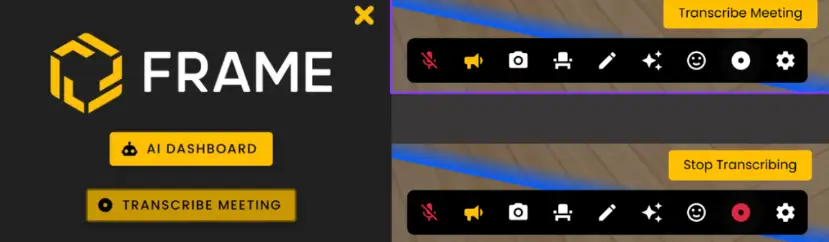
You can easily start and stop transcriptions using the intuitive buttons located in both the Toolbar and the Sidebar. The record button's color indicates its current status:
- •White: Transcription is inactive
- •Red: Transcription is currently active
2. Managing Live Transcription
The following list defines the Transcription functionality during meetings:
- •Notifications: You'll receive clear notifications when transcription is active
- •Live Transcript: Access the real-time transcript via the 'See Meeting Notes' option
- •Ending Transcription: Conclude the transcription process by selecting 'Stop Transcribing'
- •Post-Transcription: After the meeting, you can immediately view the generated report or have it emailed to you for convenient access

3. Meeting Records
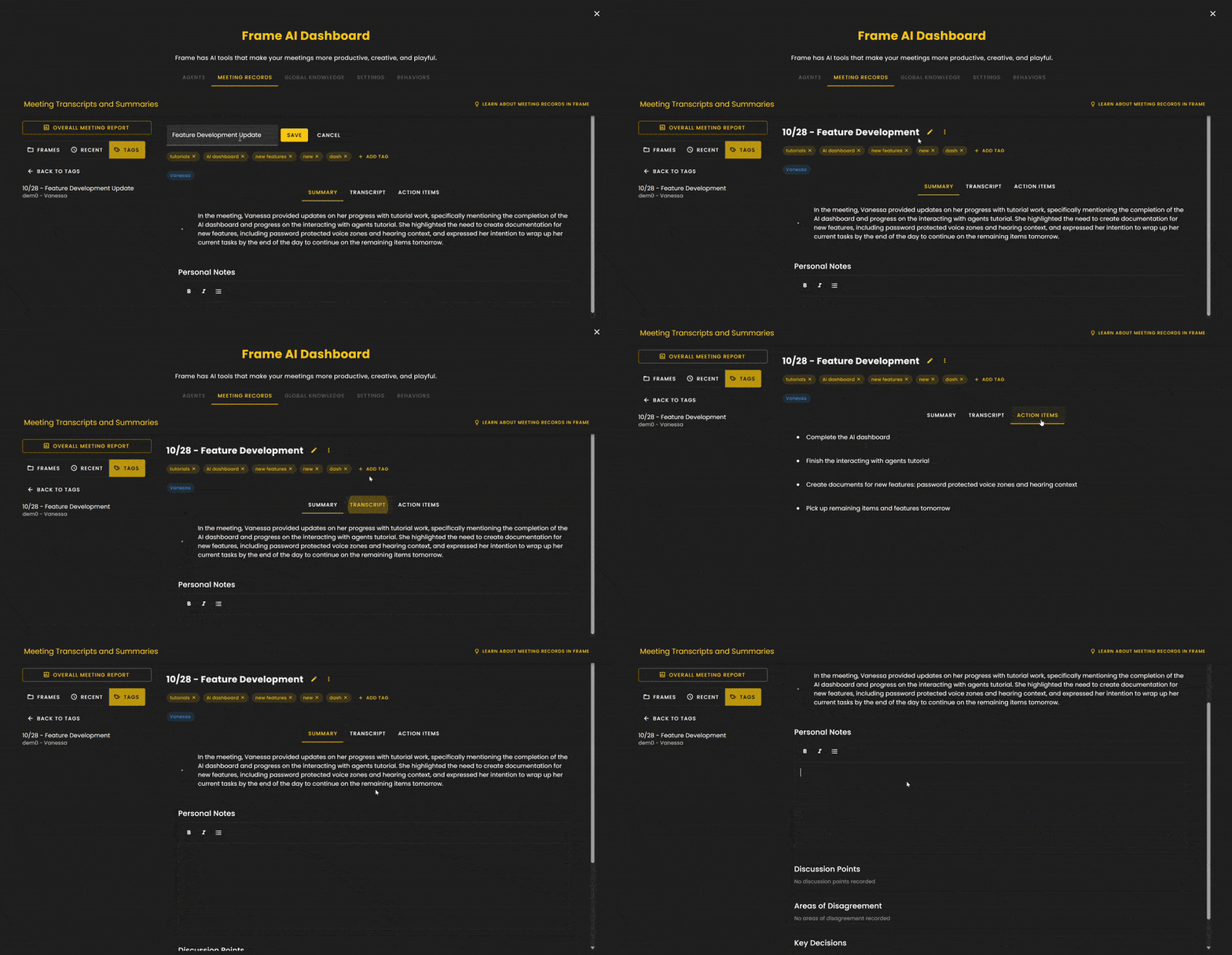
Meeting Record Information can be found in the Frame AI Dashboard. Meeting records are organized by frame name and date for easy access. Each meeting record includes:
- •Autogenerated Meeting Title: A concise title summarizing the meeting's content
- •Bulleted Summary: A quick overview of the key discussion points
- •Topic Tags: Relevant tags for easy categorization and search
- •Participant Tags: Identifies all meeting attendees
- •Full Transcript: A complete written record of the meeting
- •Action Items Tab: An organized list of action items identified during the meeting
Ready to build with Frame?
Join thousands of creators who are building amazing 3D experiences with Frame VR.
For technical assistance, please contact us at support@framevr.io or reach out via our Discord community.
For general inquiries or feedback about Frame, please email hello@framevr.io