
Text Area
Use text areas for longer format text content in your Frame
Now showing Text Area
Text labels are perfect for name tags for offices or buttons. Text labels can only support single-lines of text unlike Text Areas that can support multiple lines of text.
The Creation Menu button in the toolbar
Click the Creation Menu button in the toolbar.
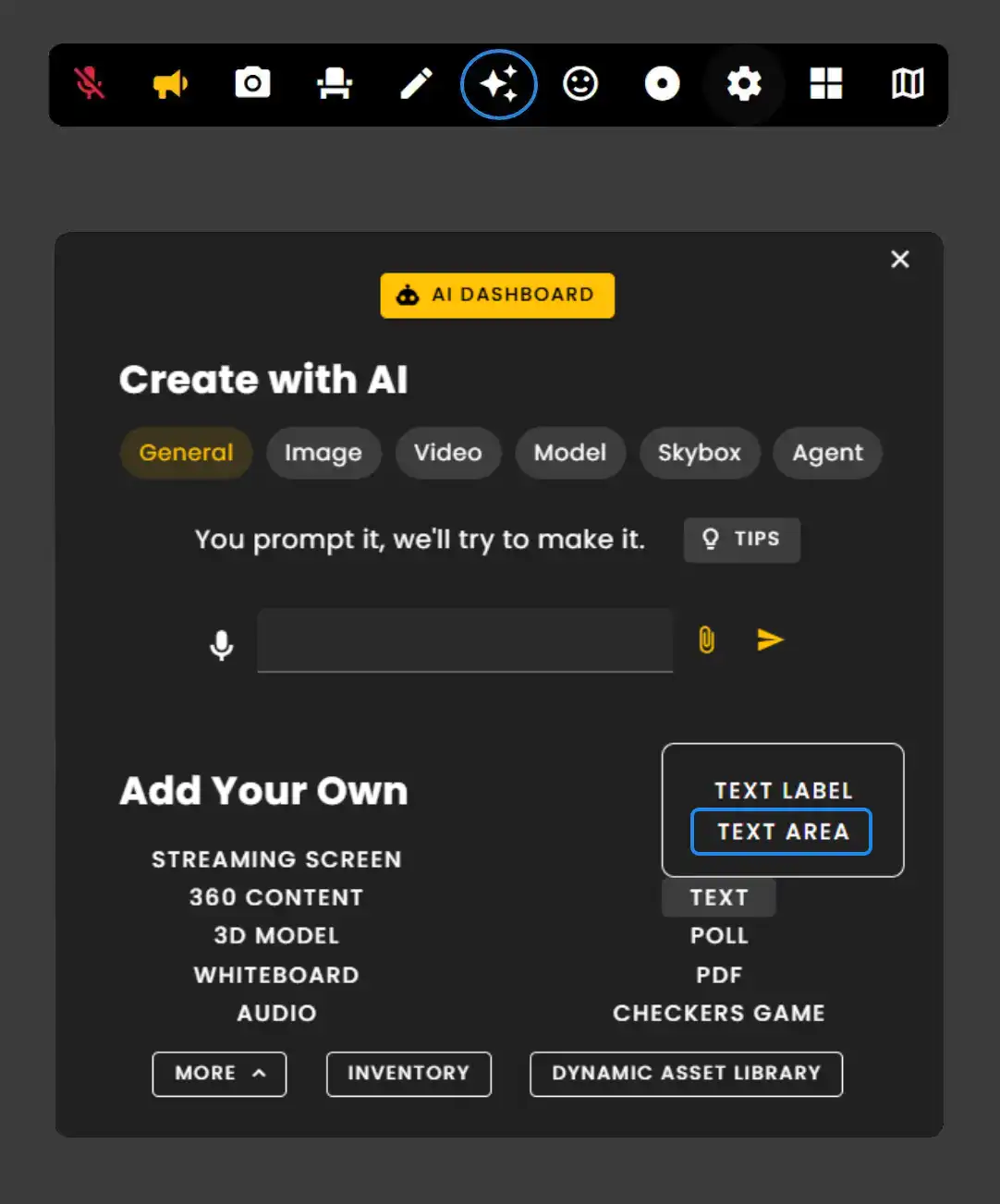
Click 'Text Label' under Text, then select 'Text Area' from the expanded menu.
Text Area Edit Menu
Go into Edit Mode and click the Text Area asset to see its Edit Menu.
- •Use 'Snap to Surface' to quickly place labels right where you need them.
- •Labels can have backgrounds or you can enable the Transparent setting to only show the text.
- •Use Scale buttons to increase or decrease the labels sizing.
To learn more about Text Labels go here.
Remember: Text Areas support multiple lines of text and are ideal for longer descriptions, instructions, or information displays.
Ready to build with Frame?
Join thousands of creators who are building amazing 3D experiences with Frame VR.
For technical assistance, please contact us at support@framevr.io or reach out via our Discord community.
For general inquiries or feedback about Frame, please email hello@framevr.io