
Tutorial Part 2: Adding Seats, Ezpanels, Custom Nav Meshes
Enhance your Frame with interactive elements and custom navigation logic.
In this tutorial, we dive into adding functionality to your environments. You'll learn how to create seats for users, 'Easy Panels' for quick asset attachment, and custom navigation meshes to define where people can walk.
Adding Seats
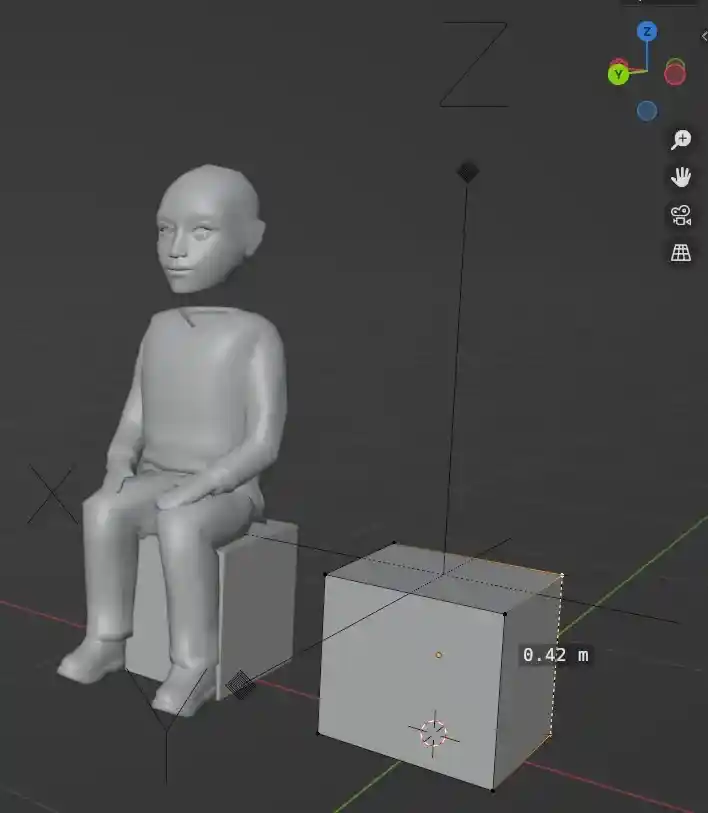
Making seats for your environment or individual models is simple using Blender. Follow these steps:
- •Add an **Empty Object** to your scene.
- •Place the empty exactly where you want the user to sit.
- •Standard sitting height is **.42 m** above the floor.
- •Name the seat with the suffix **_fcta**, for example: `couch_fcta`.
- •Rotate the locator so its **Z axis faces up** and its **Y axis faces forward**.
- •Include these Empty objects when you export your .glb file.
- •Import into Frame and the seats will be automatically recognized!
Ezpanels & Nav Meshes
Beyond seats, this tutorial covers how to set up Easy Panels for end-users to attach their own assets and how to bypass automatic navigation generation with your own custom meshes.
Ready to build with Frame?
Join thousands of creators who are building amazing 3D experiences with Frame VR.
For technical assistance, please contact us at support@framevr.io or reach out via our Discord community.
For general inquiries or feedback about Frame, please email hello@framevr.io