
FAQ & Others•Intermediate•1 min
How to fix GLB error?
Quickly fix GLB import errors for your 3D assets
In case you see the text "Only WebGL 1 was found, but WebGL 2 is required" in your updated Chrome browser, be sure to confirm these settings:
System Settings
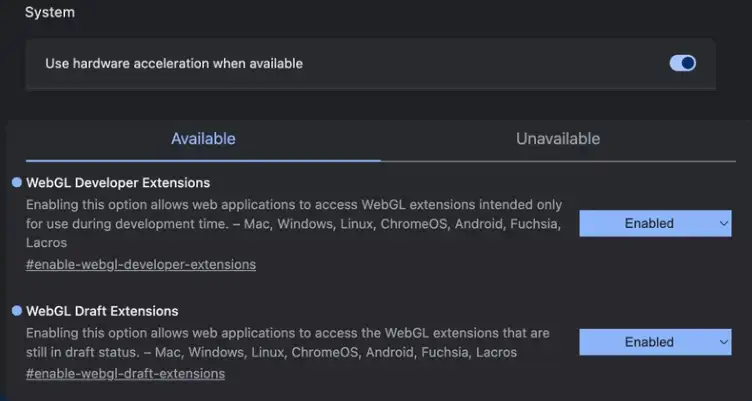
Make sure hardware acceleration is enabled in your browser settings:
- •Go to Chrome Settings > System
- •Enable "Use hardware acceleration when available"
WebGL Settings
Under chrome://flags/, be sure these two options are enabled:
- •WebGL Developer Extensions - set to Enabled
- •WebGL Draft Extensions - set to Enabled
Ready to build with Frame?
Join thousands of creators who are building amazing 3D experiences with Frame VR.
For technical assistance, please contact us at support@framevr.io or reach out via our Discord community.
For general inquiries or feedback about Frame, please email hello@framevr.io