
Frame on Mobile
Learn how to navigate on your mobile device and connect from anywhere
Frame works on tablets and smartphones so long as they are relatively modern and have an up-to-date operating system. We recommend Safari for iOS devices and Chrome for Android or other device types.
Navigating on Mobile
We do not recommend using Mobile or VR devices to setup Frames and should only be used to perform very basic actions like speaking and viewing content.
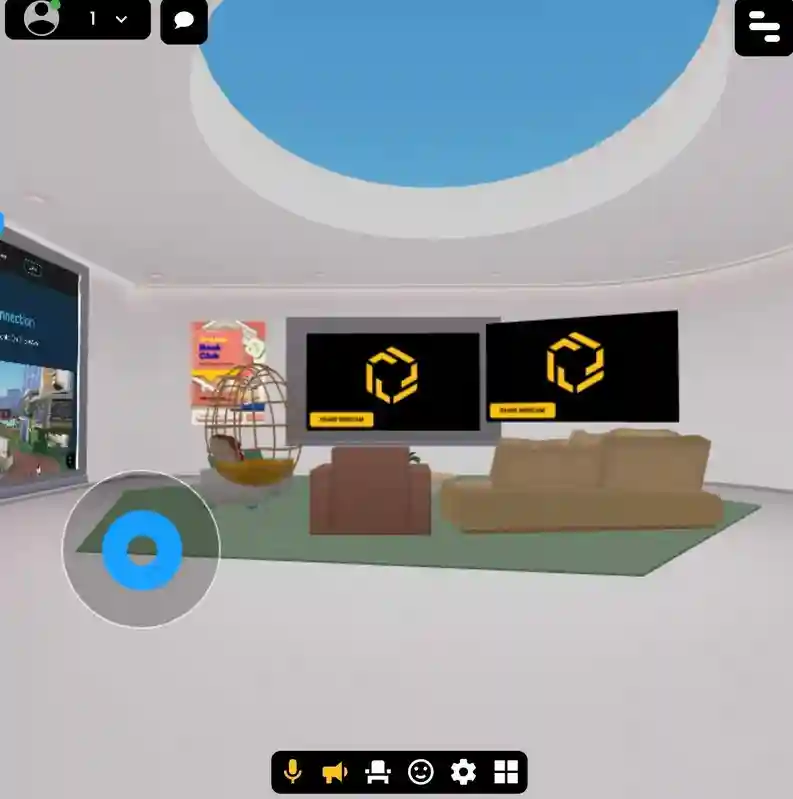
To navigate Frame on Mobile there are a few actions you can perform:
- •Use the blue joystick on the left side of the screen.
- •Swiping the screen controls camera rotation.
- •You can also double tap the ground on your screen to move to that point.
- •To Zoom into Streaming Screens simply tap the streaming screen and tap 'Zoom'.
Limited Features
Some features like Sharing Screen and Laser Pointers can not be accessed on mobile.
Having Trouble?
If your device is having difficulty loading Frame, our Quick Interface is a great way to still attend meetings and presentation.
Ready to build with Frame?
Join thousands of creators who are building amazing 3D experiences with Frame VR.
For technical assistance, please contact us at support@framevr.io or reach out via our Discord community.
For general inquiries or feedback about Frame, please email hello@framevr.io