
Creation•Intermediate•2 min
Environments & Performance
Find out how to select and switch environments to set the scene for your Frame
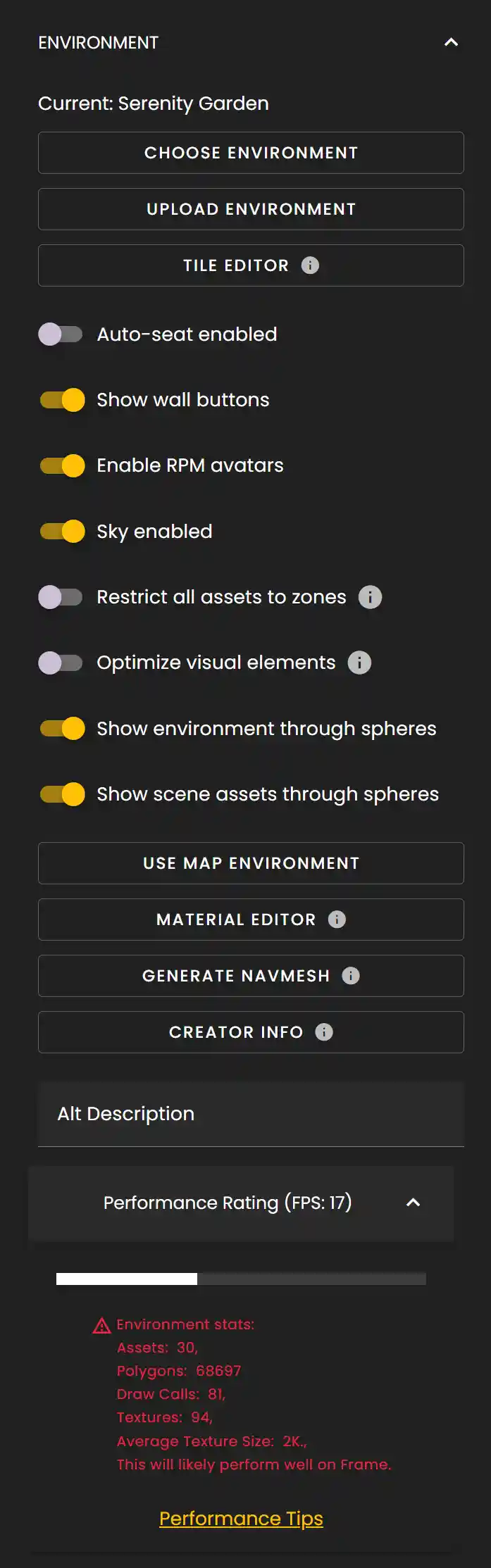
In the Frame settings, you'll find a variety of options to customize your environment and optimize performance. Here's a breakdown of the key settings you can adjust.
Environment Settings
- •**Environment Drop Down**: Select from a list of pre-made environments provided by Frame.
- •**Upload Custom Environment**: Upload your own 3D environment in .glb format.
- •**Upload Frame Tile Map**: Upload a tile map for specific environment layouts.
- •**Generate Navmesh**: Create a navigation mesh to define where users can walk in your custom environment.
- •**Auto-seat enabled**: With auto-seat enabled, users will be placed into a seat when they first come into the Frame. It will try to find the closest available seat to the spawn spot.
- •**Restrict all assets to zones**: Only render assets that are within the same zone as the user, improving performance in large Frames.
- •**Enable RPM avatars**: Ready Player Me is a third-party avatar customization system. While wonderful, keep in mind they are heavier than Frame avatars. For large-scale interactions, we recommend disabling them.
- •**Sky enabled**: Toggle the visibility of the skybox.
- •**Enable default scene light**: We recommend keeping this on unless you are bringing in custom lights in your own imported 3D environment.
- •**Enable shadows for 3D models**: This will enable shadows for objects in your Frame.
- •**Enable scene reflections**: Items in your Frame will reflect off each other if they have reflective textures. This will impact performance.
- •**Reflect expanded spheres**: If you have a photosphere expanded, your textures will reflect it. This will impact performance.
- •**Enable bloom**: Diffuses bright pixels to mimic lens artifacts of real cameras.
- •**Enable image processing pass**: Update the contrast and exposure of the camera.
- •**Enable depth of field**: Gives a background blur effect that you can tweak.
- •**Enable glow layer**: Makes meshes with emissive properties glow.
- •**Enable grain**: Adds grain noise to the renderer for a specific visual style.
- •**Sharpen Effect**: Adds a sharpening filter to make edges pop and reduce pixelation.
- •**Fast anti-aliasing**: Smooths out edges in meshes at a performance cost.
- •**Advanced anti-aliasing**: Further improves anti-aliasing at a higher performance cost.
- •**Enable SSAO for environment**: Screen Space Ambient Occlusion adds realistic shadowing between objects in close proximity. This is an advanced technique with a definite performance impact.
- •**Performance Rating**: Please see our dedicated article about the Performance Monitor for more details.
Ready to build with Frame?
Join thousands of creators who are building amazing 3D experiences with Frame VR.
For technical assistance, please contact us at support@framevr.io or reach out via our Discord community.
For general inquiries or feedback about Frame, please email hello@framevr.io