
Communication•Beginner•2 min
Closed Captions
Turn on live captions during meetings so everyone can follow along
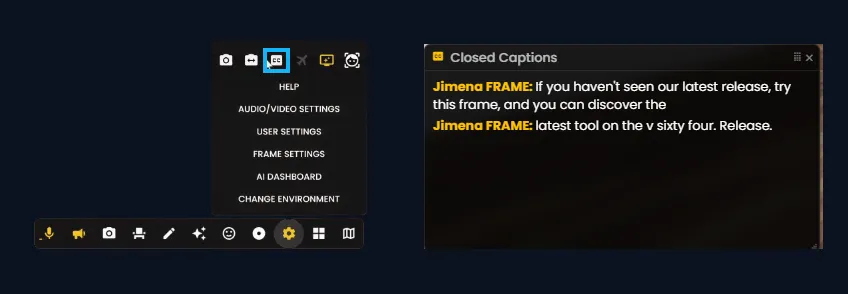
Closed Captions in Frame display live speech-to-text during your meetings, making sessions more accessible for everyone. Turn captions on from the Transcript and CC button in the toolbar or sidebar to follow along in real time.
Turn on Closed Captions
Use the Transcript and CC button to enable live captions during a meeting:
- •Click the CC button in the toolbar or sidebar to turn closed captions on or off.
- •Live text appears on screen as participants speak.
- •Set your voice chat language in Profile Options for more accurate captions.
Ready to build with Frame?
Join thousands of creators who are building amazing 3D experiences with Frame VR.
For technical assistance, please contact us at support@framevr.io or reach out via our Discord community.
For general inquiries or feedback about Frame, please email hello@framevr.io