Introducing Flat Mode
Flat Mode in Frame VR — The Best of 2D and 3D Collaboration. Bringing together the simplicity of video meetings with the power of immersive 3D collaboration.
Flat Mode in Frame VR — The Best of 2D and 3D Collaboration
Video calls have come a long way, but they still have limits. That's why Frame built something better. Flat Mode brings together the simplicity of a familiar video meeting with the power and flexibility of immersive 3D collaboration — all in one seamless experience.
A familiar layout, smarter features
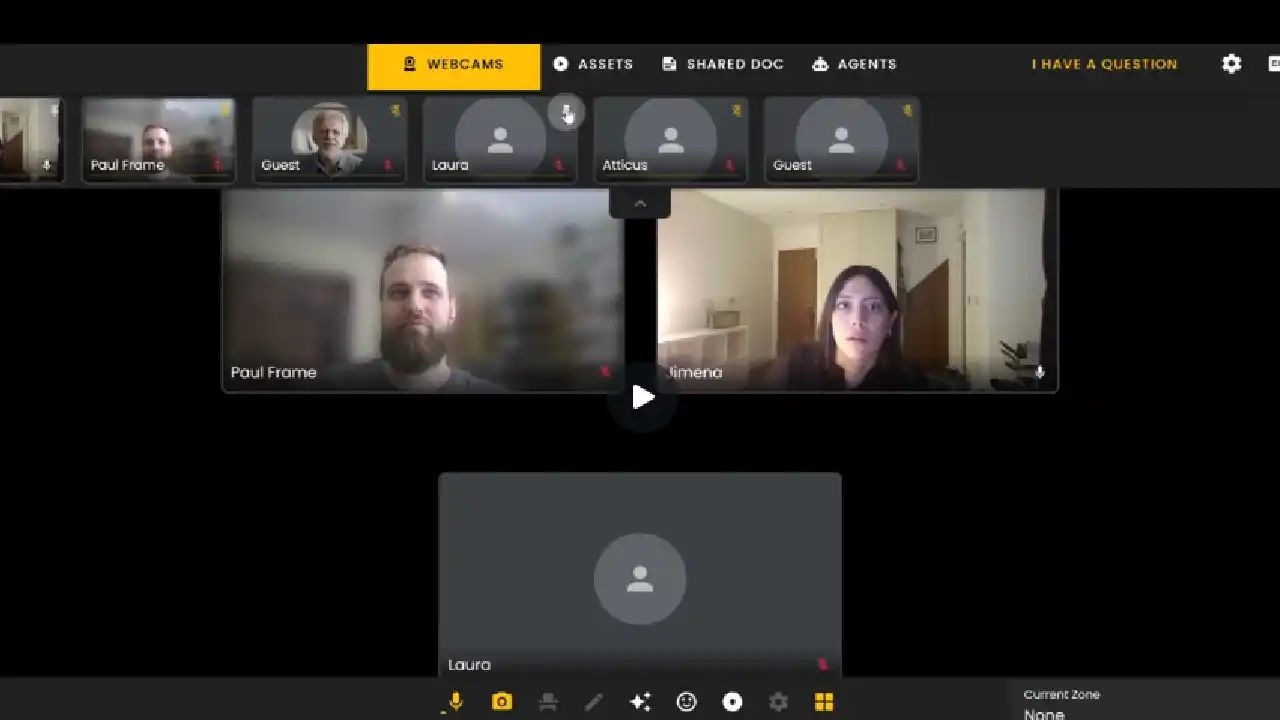
When you join a session in Flat Mode, it feels comfortable and intuitive. You'll see a grid view of participants' webcams and can easily tell who's speaking thanks to the active speaker view. If no one is talking, you'll see a simple "No Active Speaker" message to keep things clear.
Want to keep someone's camera in focus? Just use the pin feature to highlight specific users or everyone in the call. You still have access to Frame's advanced tools ,including real-time translations — all without needing to step into 3D space.
From simple call to spatial collaboration
One click is all it takes to jump into 3D whenever your team wants to brainstorm more visually or interact with shared assets. Unlike traditional video calls, Flat Mode keeps your webcams and spatial tools just a heartbeat apart. You decide whether to stay simple or go immersive — no app switch required.
Manage assets with ease
In Flat Mode, assets like screens and models stay secure and organized. To ensure privacy, enable two key options:
Frame Sidebar > General Settings: turn on Private Voice Zones
Frame Sidebar > Environment Settings: set Restrict all assets to zones
Once active, you can click to move an asset between focus and pool, drag to reposition, or resize by pulling the bottom-right corner. To reset an asset to its original size, just open the three-dot menu and select Resize.
AI agents always within reach
The Agents tab gives you a quick way to interact with Frame's built-in assistants, like Sasha, or your own custom AI agents. Each one has a separate knowledge base, ensuring clean organization between human participants and AI helpers. Use them for translation, note-taking, or even training new team members — all right from your Flat Mode interface.
Collaboration without compromise
Flat Mode removes the friction between 2D and 3D collaboration. It's perfect for users who want the efficiency of video calls and the depth of VR — without choosing between the two.
Whether you're hosting meetings, presenting projects, or training with AI support, Frame's Flat Mode helps you stay connected, productive, and ready for the next step.
Ready to Transform Your Meetings?
Experience the future of collaboration in immersive 3D spaces.
Try Frame Free